A gambling app device testing matrix is a documented selection of device, operating-system and environment combinations, with a reason for testing each one. It turns an impossible instruction—“test every phone”—into an auditable coverage decision. The matrix should show what is supported, where failures would matter most, which combinations were actually tested and which risks remain outside the sample.
Quick answer: Start with the app’s supported-device population, not a list of popular handsets. Rank combinations by user exposure, consequence of failure, recent change and platform variability. Cover the highest-risk journeys on physical iOS and Android devices, then use simulators and cloud labs to extend OS, screen and configuration breadth. Keep locale, network and accessibility settings as explicit test dimensions. Record evidence and exclusions before a release decision.
This guide owns device selection and risk-based test coverage. The localization workflow defines how in-app language quality is accepted; the accessibility acceptance brief defines what accessible behavior must pass; the phased rollout plan defines production deployment gates. Device sampling cannot replace those decisions.
1. Define the Supported Device Population Before Choosing a Lab
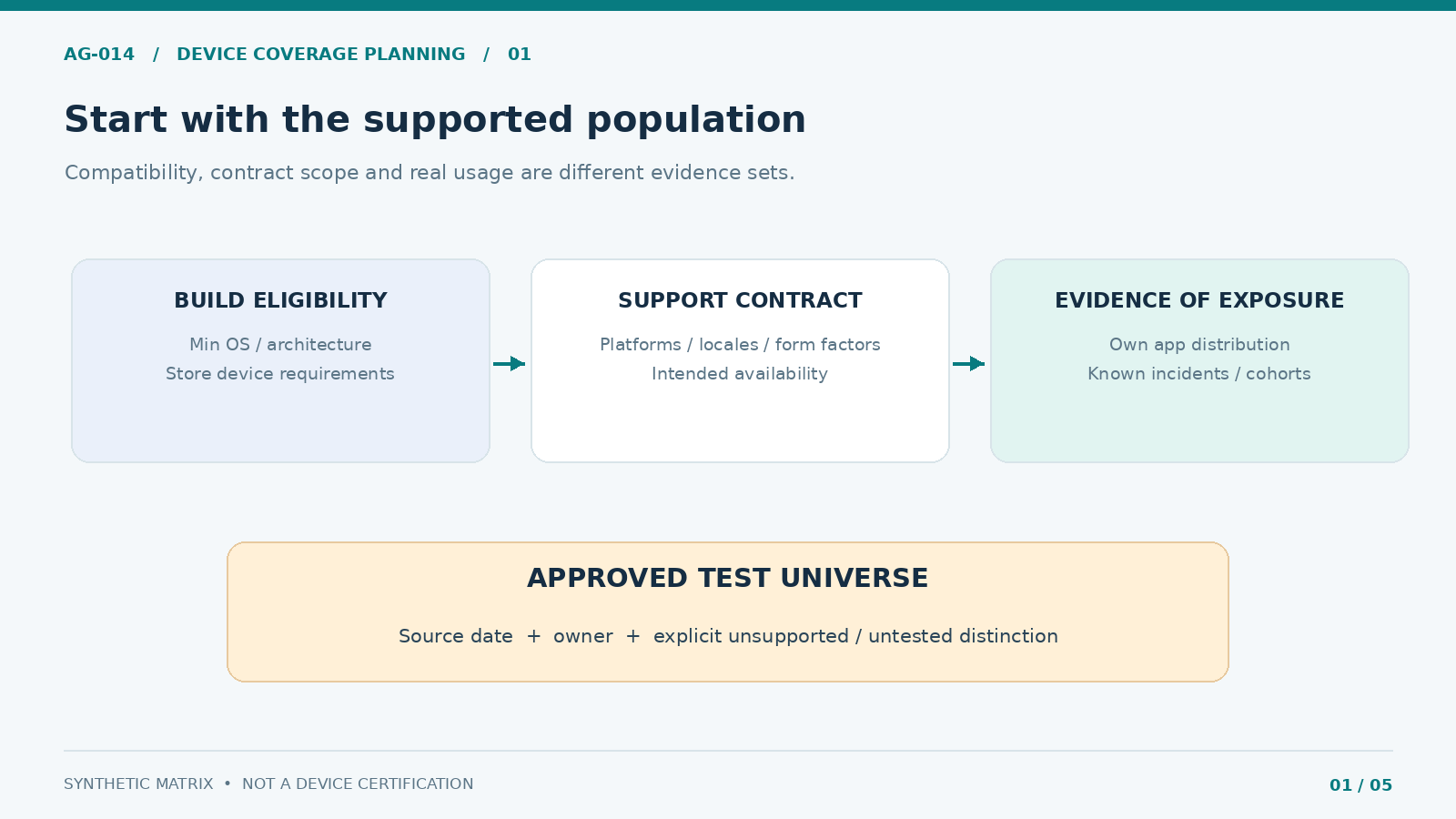
Establish the test universe from the actual release artifact and business scope. Record iOS and Android minimum OS requirements, supported device families, architecture constraints, orientation, browser or webview dependencies, and whether tablets or foldables are explicitly supported. Use exact build configuration and store eligibility, not an outdated statement in the project brief. Apple exposes device and minimum-OS requirements in App Store Connect build metadata; Android teams can review their app’s supported and excluded models in the Google Play device catalog.
Separate three populations: devices technically capable of installing the build, devices allowed within the intended product and market scope, and devices genuinely represented in the expected user base. An OS version with little global market share may still matter if the app’s supported audience relies on it. Market share alone does not justify dropping a supported device from testing.
For an existing app, inspect device distributions, crash/ANR trends and support reports. Google Play Reach and devices offers app-level breakdowns; App Store Connect Analytics includes device and platform-version filters where data is available. Account for privacy-related gaps, biased samples and stale snapshots. For a new product, label estimates as assumptions and schedule a review when real evidence arrives.
Inventory fields to preserve: platform, build, OS floor and latest supported OS, device class, screen size band, memory/performance tier, vendor customization, supported locales, source date, install eligibility and the owner approving exclusions.
2. Apply Risk Weights—and Keep Mandatory Coverage Separate
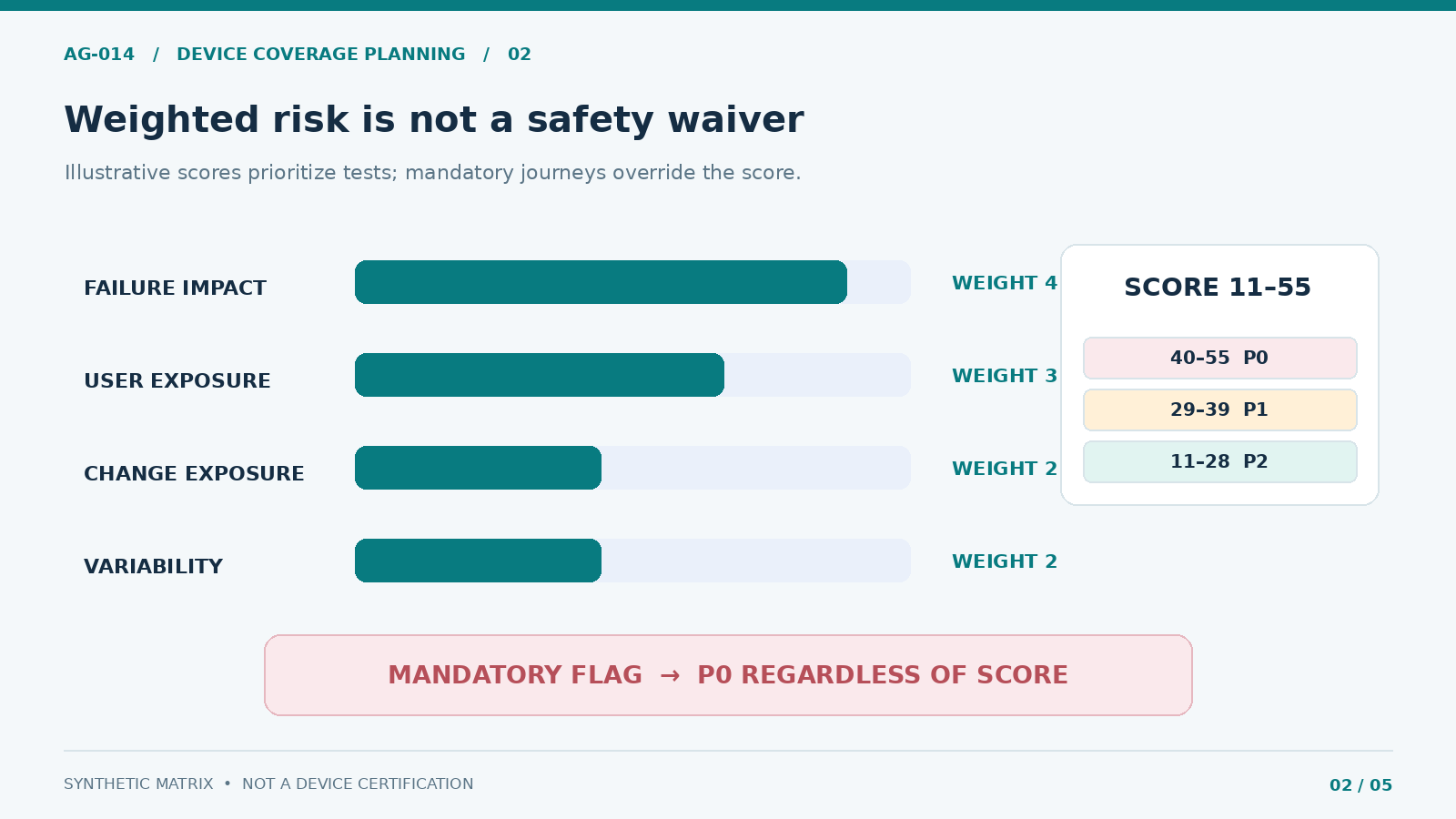
A risk score helps allocate limited QA time, but must not become a way to waive a critical safety or account flow. Use the score to order discretionary tests, then apply mandatory coverage overrides for the most consequential failures. An example model assigns each dimension a value from 1 (low) to 5 (high):
- Failure impact (weight 4): Could a defect block authentication, identity verification, account access, withdrawal status, a protection setting or reliable error handling?
- Population exposure (weight 3): How many supported users or high-value support cohorts rely on this configuration, based on evidence rather than guesses?
- Change exposure (weight 2): Did the release alter OS APIs, dependencies, layout behavior, biometric flows, embedded webviews or background processing?
- Configuration variability (weight 2): Does this combination introduce a different vendor skin, resource limit, fold state, locale layout or networking behavior?
The illustrative formula is 4 × impact + 3 × exposure + 2 × change + 2 × variability, yielding 11–55. Scores of 40–55 are P0, 29–39 P1 and 11–28 P2 in the accompanying template. These are internal planning thresholds, not platform standards or proof of risk acceptance. An explicit mandatory flag forces P0 even when the numeric score is lower. Recalibrate weights against actual defect escapes and supported-device evidence.
| Priority | Selection rule | Minimum planning response |
|---|---|---|
| P0 — mandatory/high consequence | Mandatory journey or example score 40–55 | Physical-device evidence on each relevant platform; blocked until pass or approved remediation |
| P1 — elevated | Example score 29–39 | Representative device and OS band, targeted regression and documented evidence |
| P2 — sampled | Example score 11–28 | Pairwise or equivalence-class coverage; explicit owner for exclusions |
Score the test configuration, not a device brand in isolation. A budget Android handset on a constrained network may expose a failure that a flagship cannot. A recent iPhone and an older supported iPhone may differ more meaningfully in memory or OS behavior than in screen size. Duplicate combinations need a clear additional hypothesis or they waste time.
3. Cover OS Releases, Form Factors and Real Hardware
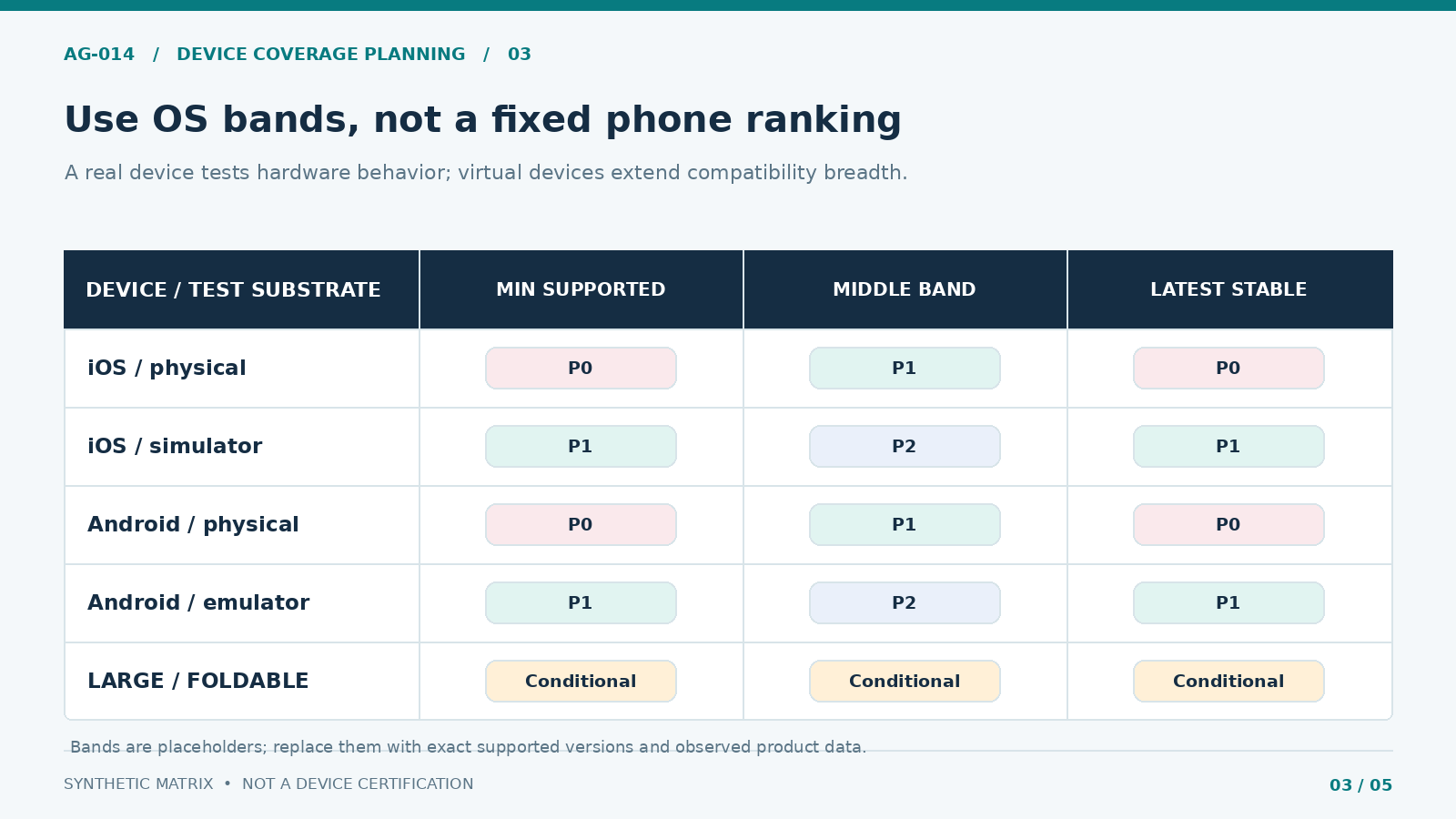
Use OS bands rather than pinning the article to a temporary list of version numbers: minimum supported, a representative middle version when the installed base justifies one, and latest supported stable. Add a new or beta OS only as a separately labeled forward-compatibility investigation; do not silently count it as production-certified. For Android, include at least one materially distinct device/vendor configuration and relevant API behavior. For iOS, cover meaningful hardware generations when memory, screen geometry or system behavior differ.
Android’s core app quality guidance recommends a focused set of actual devices, emulators for broader combinations and testing against the latest Android version. Apple’s Xcode documentation warns that simulators do not reproduce every physical-device behavior. If performance, biometric interaction, push delivery, hardware-backed authentication or app/background transitions matter, capture evidence on real hardware.
| Test dimension | Baseline representative choice | Escalate coverage when… |
|---|---|---|
| OS lifecycle | Minimum, representative middle, latest supported stable | An SDK, API level or system-permission behavior changes |
| Form factor | Compact phone and mainstream phone; tablet/foldable if supported | Resize, hinge or orientation changes alter layout/state |
| Device capability | Constrained memory/performance and mainstream device | Startup, storage, animation or battery regressions appear |
| Test substrate | Automation on emulator/simulator plus targeted real hardware | Biometrics, notifications, hardware integration or performance are involved |
| External components | Embedded webview and relevant third-party SDK version | Provider update or device-specific crash is reported |
For supported foldables or tablets, test resizes, rotation and restoring task state. Android’s screen and window testing guidance discusses configuration changes and state restoration. A desktop browser viewport is not a substitute for a real mobile webview with system navigation and keyboard behavior.
Do not infer that a green cloud-lab report covers every device in a product’s supported population. Firebase Test Lab has changing device availability and capacity; a retired device or skipped execution must be recorded as not tested, not passed.
4. Add Locale, Connectivity and Accessibility as Independent Axes
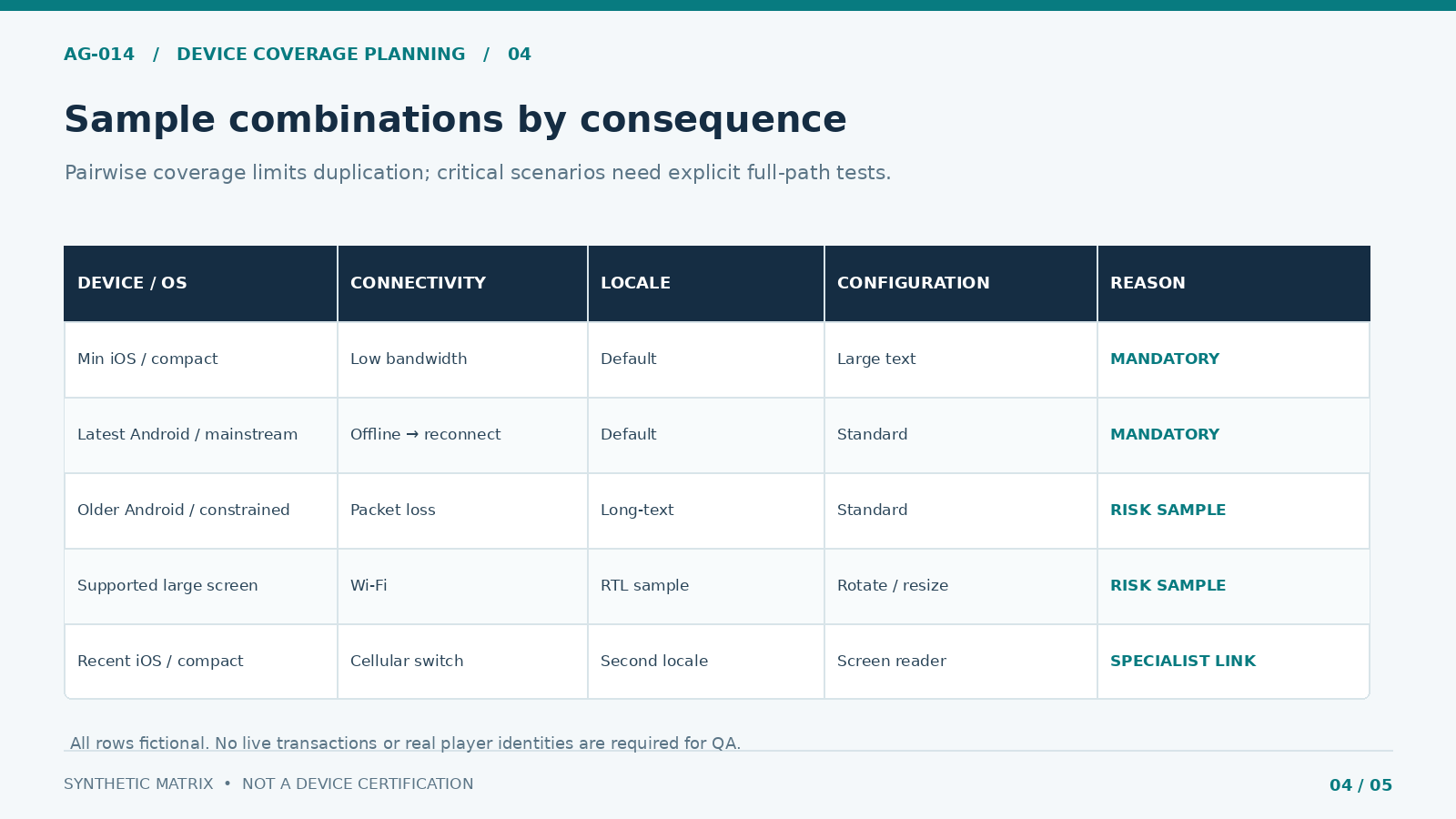
The Cartesian product grows quickly: five devices, three OS bands, four network profiles and three locales already create 180 combinations before accessibility settings or orientations are added. Running one flow on every permutation is rarely the best use of QA time. Use risk-based combinations and pairwise sampling for lower-consequence interactions, while preserving complete mandatory cases for critical paths.
Test realistic failure states, not just “Wi-Fi versus mobile data.” Include degraded throughput, packet loss, offline/reconnect, app background/foreground, interrupted authentication and delayed server responses. Do not generate live deposits, wagers or withdrawals merely to exercise network conditions: use approved sandbox accounts, simulators and controlled test endpoints with synthetic data.
Treat language and accessibility as coverage dimensions, not proxies for acceptance. A long translated string may reveal clipping on a compact screen; a right-to-left layout can expose navigation defects; large text or a screen reader can alter focus and keyboard behavior. AG-007 supplies translated strings and locale QA rules. AG-010 owns the actual accessibility pass conditions; this matrix states where those checks are run.
For example, require the minimum supported phone OS to execute account recovery with a low-bandwidth profile, a compact Android to exercise a long-text locale, and a supported larger screen to test focus after rotation. Choose combinations from real product requirements; the examples in the download are synthetic, not a certified test list.
5. Fill In the Device Testing Matrix and Record Evidence
Each matrix row should point to one reproducible environment and one test objective. Avoid rows such as “Android devices — pass,” which conceal OS versions, missing equipment and partial tests. The downloadable workbook records priority, mandatory override, selection rationale, assigned owner, run status, evidence link and reviewed exclusion. It ships with example values and every test marked Not Run.
A useful execution record includes build hash or identifier, device model and hardware/virtual status, exact OS build, locale, font scale, accessibility configuration, network profile, test case, result, reproducible failure, defect ID and evidence timestamp. Save video or screenshots only when approved; test artifacts must not include real identities or sensitive account details.
For traceability, distinguish planned from executed tests. Cloud-lab results can be inconclusive or skipped; neither is a pass. The Firebase Test Lab matrix documentation separates selected device configurations from test executions.
| Matrix status | Evidence rule | Release-coverage treatment |
|---|---|---|
| Pass | Build, environment, case and result link | Count only with traceable proof |
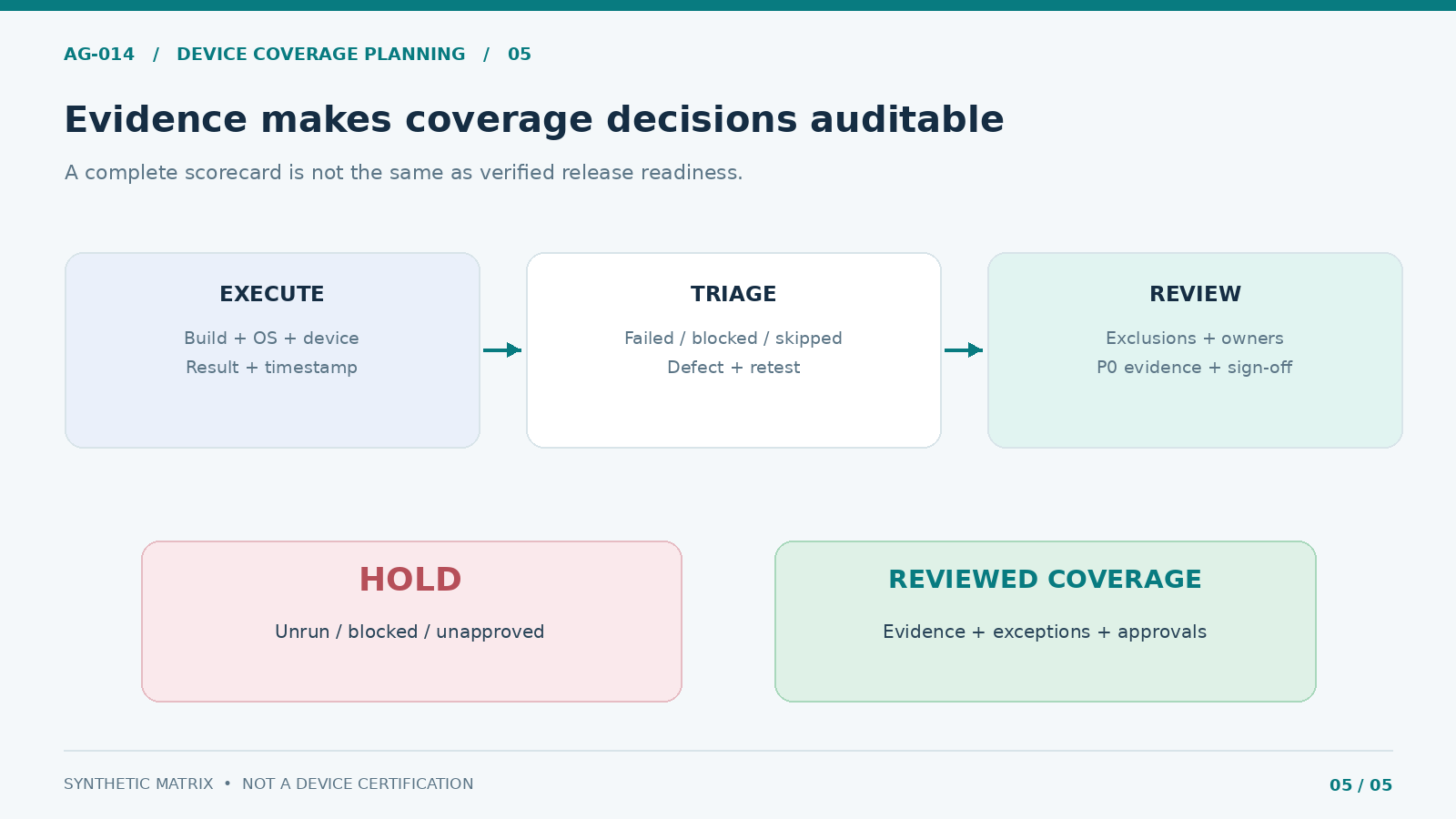
| Fail / blocked | Defect ID, owner and retest plan | HOLD pending resolution |
| Skipped / not run | Reason; no execution evidence | Untested, never counted as pass |
| Excluded with approval | Named scope exception and risk owner | Separate from supported-device pass rate |
Use the attached files: Device Coverage Matrix, Execution Evidence Log and the Excel QA Coverage Workbook. They are planning tools, not a guarantee of coverage. Review each synthetic row against the actual app before any test run.
6. Review Exclusions, Refresh Triggers and Release Handoff
Testing less than the full supported population is an explicit trade-off. Write down what is excluded, why the remaining sample is representative, which defect class might be missed, and who accepted the residual risk. Unsupported means outside the published support contract; untested means inside that contract without evidence. Do not interchange the terms.
Reopen the device matrix when the minimum OS changes, a major stable OS arrives, an SDK updates, a vendor-specific crash emerges, a new form factor becomes supported, device distribution shifts, or an accessibility/locale defect indicates a coverage gap. Also revise after incidents and customer-support patterns show the original selection was wrong. Date the underlying distribution snapshot.
Before sign-off, the QA lead should be able to answer five questions: Is the supported population documented? Are every P0 and mandated critical journey covered by executed cases? Have failures and inconclusive runs been triaged? Are omissions and exceptions approved by the right owners? Is the evidence tied to the release candidate? A high aggregate pass percentage cannot excuse a missing P0 case.
In the workbook, HOLD is the default until planned tests pass, exclusions are reviewed, blocking defects are resolved and explicit cross-functional approvals are recorded. This is a test-coverage decision, not authorization to operate a gambling product or deploy an update. The phased rollout runbook handles the distinct production go/no-go and rollback decision, with separate compliance and operational controls.
FAQ
How many devices should a gambling app QA team test?
There is no universal number. Use a small set of representative physical devices for critical platform behavior, then broaden OS and form-factor checks with automated labs. The correct count depends on the app’s supported population, defect history, integrations and release changes—not a fixed “top 10 phones” list.
Is a simulator sufficient for OS compatibility testing?
No. Simulators and emulators are effective for repeatable compatibility and layout checks, but they do not fully represent hardware performance, vendor implementation, push notifications or all secure-device features. Keep real-device evidence for high-consequence or hardware-dependent scenarios.
How often should the QA device matrix change?
Review it for every significant release and whenever OS support, device distribution, integrations or escaped defects change. Record the trigger and approving owner so the matrix remains a current control rather than a one-off spreadsheet.
Can a 100% pass rate prove full device support?
No. It shows that the executed, scoped cases passed. It says nothing about omitted, skipped, blocked or untested combinations. Publish the scope, exclusions and evidence alongside any coverage claim.
Should locale and accessibility be separate matrices?
Their acceptance standards should remain under their specialist owners. The device matrix should reference those tests and specify the device, OS and environment combinations in which they are executed, so no critical intersection is missed.