Gambling app accessibility acceptance criteria turn broad design promises into requirements a buyer can test before accepting a mobile build. A useful brief names the affected user journey, the expected behavior, the test method, the evidence file and the person authorized to approve the result.
Quick answer: Start with WCAG 2.2 Level A and AA as a reference, interpret its relevant criteria for each native, web or hybrid surface, and write pass/fail checks for screen-reader operation, text scaling, contrast, input alternatives and error recovery. Require build-specific testing records and block sign-off when critical journeys remain inaccessible. A signed template is not an accessibility audit or legal certification.
This article covers acceptance specification and vendor handoff. Component catalog governance belongs in the gambling app design-system handoff, detailed player-protection controls in the safer gambling UX requirements, and device sampling methodology in the mobile gambling QA device matrix. Confirm those internal URLs against the published site map before release.
1. Choose the Source Standard and State Its Limits
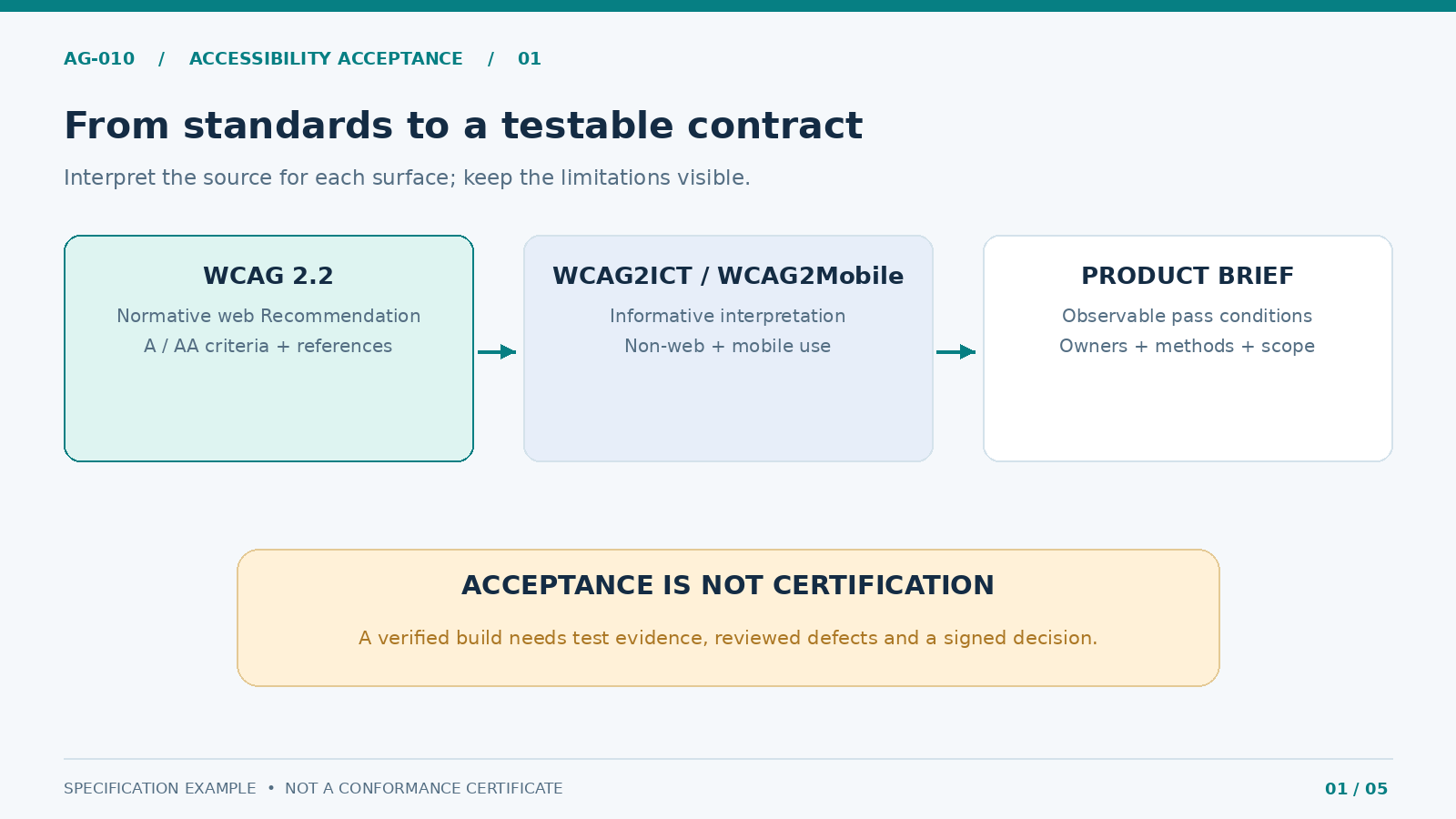
Use the W3C WCAG 2.2 Recommendation as the versioned source for web success criteria. Specify the target level, usually A and AA, but do not treat the source as a ready-made native-app certificate. The W3C WCAG2ICT guidance explains how WCAG can be interpreted for non-web software. The WCAG2Mobile 2.2 draft guidance addresses native, web and hybrid mobile applications. Both interpretation documents are informative, not normative requirements; the mobile document’s current published version is a Group Draft Note. Check their status again when approving the project brief.
Define the tested product surfaces explicitly: native screens, embedded webviews, identity-verification SDKs, wallet components, support journeys and any external browser steps. Identify functionality operated by third parties and the vendor’s responsibilities when a component is inaccessible. A dependency is not a blanket exception.
Do not confuse different size measurements. WCAG 2.2’s 2.5.8 Target Size (Minimum) uses 24 by 24 CSS pixels with specified exceptions for web pointer targets. Apple’s accessibility design guidance recommends 44 by 44 points for iOS/iPadOS controls; Android recommends 48 by 48 dp touch targets. These are different units and sources. In a native brief, state the platform target guidance separately, and verify the actual hit region rather than only the visible icon.
2. Write a Product Brief With Owners and Test Boundaries
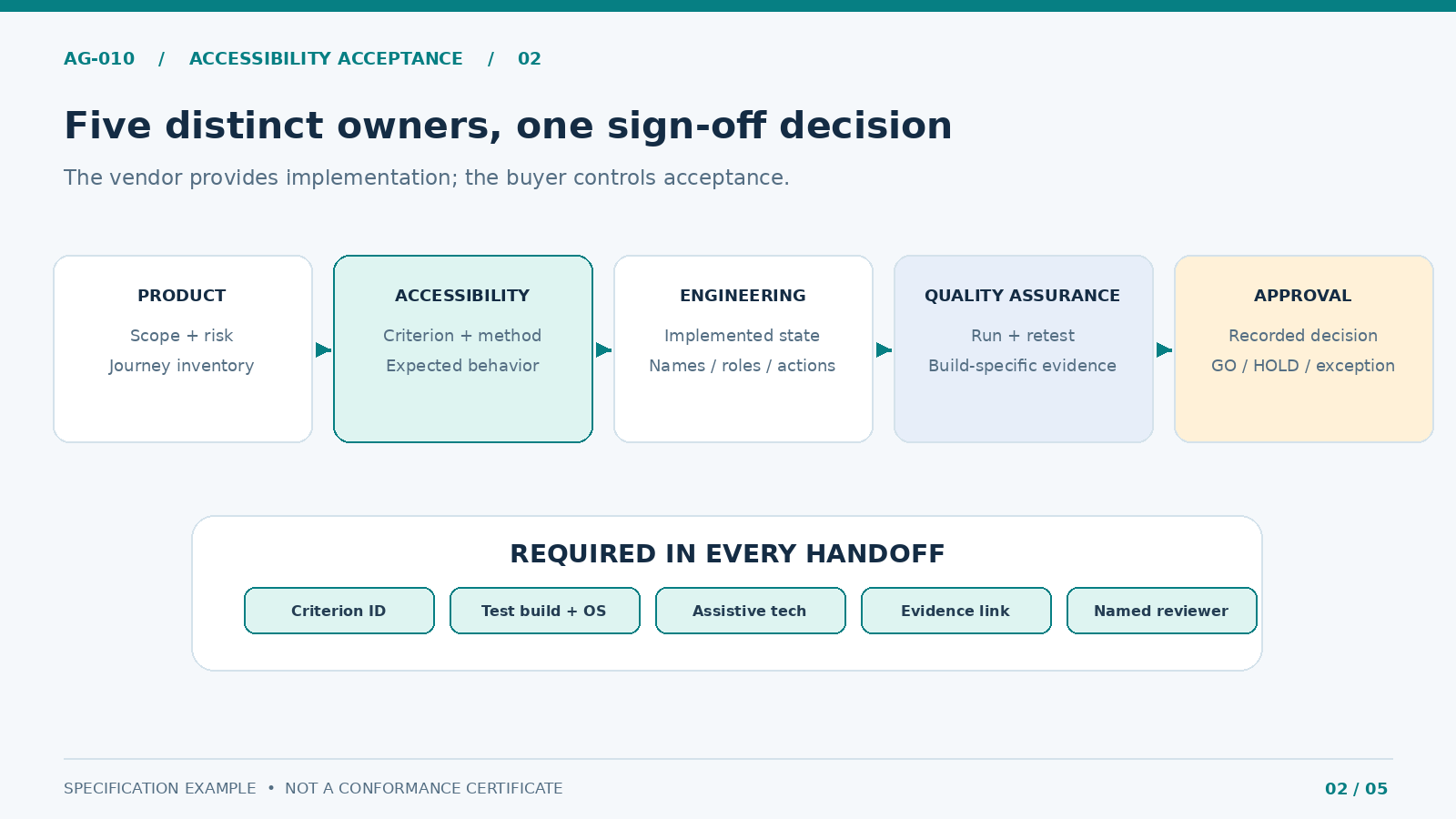
The brief should identify the product version, platform, UI technology, included flows, assistive technologies, localization scope, test environment and acceptance authority. Record whether the build is a prototype, release candidate or regression patch. Screenshots from a previous build are not evidence for a changed component.
A practical responsibility split prevents a familiar failure: everyone agrees accessibility matters, but nobody owns proof. The product owner approves scope and unresolved business risk; the accessibility lead owns interpretation and test method; design supplies interaction states and annotations; engineering exposes accessible names, roles, values and state changes; QA records results and retests; compliance reviews regulated text or mandatory customer journeys where relevant.
| Brief field | Minimum required entry | Sign-off authority |
|---|---|---|
| Baseline | WCAG version/level; mobile interpretation source and date | Accessibility lead |
| Scope | Named flows, third-party SDKs, webviews, exclusions | Product owner |
| Test environment | App build, OS version, screen reader, settings, locale | QA lead |
| Expected behavior | One observable condition per acceptance criterion | Design + engineering |
| Evidence | Case ID, recording/screenshot, result, defect link | QA + accessibility lead |
| Decision | Accepted, held or formally exceptioned, with rationale | Product owner |
Map the journeys by consequence rather than screen popularity. Include login and account recovery, verification, deposit/withdrawal status, error handling, activity history, help access and player-protection entry points. This is not the specification for how limits or exclusions must operate; it ensures that any implemented control is perceivable and operable. The safer gambling UX brief should define its functional behavior separately.
3. Define Testable Criteria Instead of Design Aspirations
Write criteria in the form Given / When / Then / Evidence. Avoid “screen-reader friendly” or “supports accessibility” without a repeatable test. Each check should describe what the tester does and what counts as a failure, including in error and loading states.
The following are sample contract-level checks, not an exhaustive WCAG mapping. The WCAG references indicate relevant web criteria; confirm their application to each native component through the documented mobile interpretation and accessibility review.
| ID / area | Pass condition in the acceptance test | Reference / proof |
|---|---|---|
| A01 — Labels and state | Every actionable item has a meaningful announced name, role and current state | WCAG 4.1.2; screen-reader recording |
| A02 — Order and focus | Reading and focus order follow the intended task; modal focus returns predictably | WCAG 1.3.2, 2.4.3; navigation trace |
| A03 — Text scaling | Supported large-text settings do not clip labels, hide decisions or block completion | WCAG 1.4.4 as relevant; scaled screenshots |
| A04 — Text contrast | Normal text meets 4.5:1; qualifying large text meets 3:1, subject to WCAG exceptions | WCAG 1.4.3; measured contrast |
| A05 — Non-text contrast | Essential control boundaries and meaningful visual states meet applicable 3:1 contrast | WCAG 1.4.11; annotated measurement |
| A06 — Input targets | Web targets satisfy applicable 2.5.8; native hit areas meet agreed platform guidance | WCAG 2.5.8 + platform check; target overlay |
| A07 — Gesture alternatives | Swipe/drag-only functions have a usable alternative unless an applicable exception is justified | WCAG 2.5.1, 2.5.7; alternative-path video |
| A08 — Errors and status | Validation names the field and correction; relevant async status is announced | WCAG 3.3.1, 4.1.3; failure-state capture |
| A09 — Time and motion | Timeouts, moving content and motion alternatives are evaluated against applicable criteria | WCAG 2.2.1, 2.2.2; test notes |
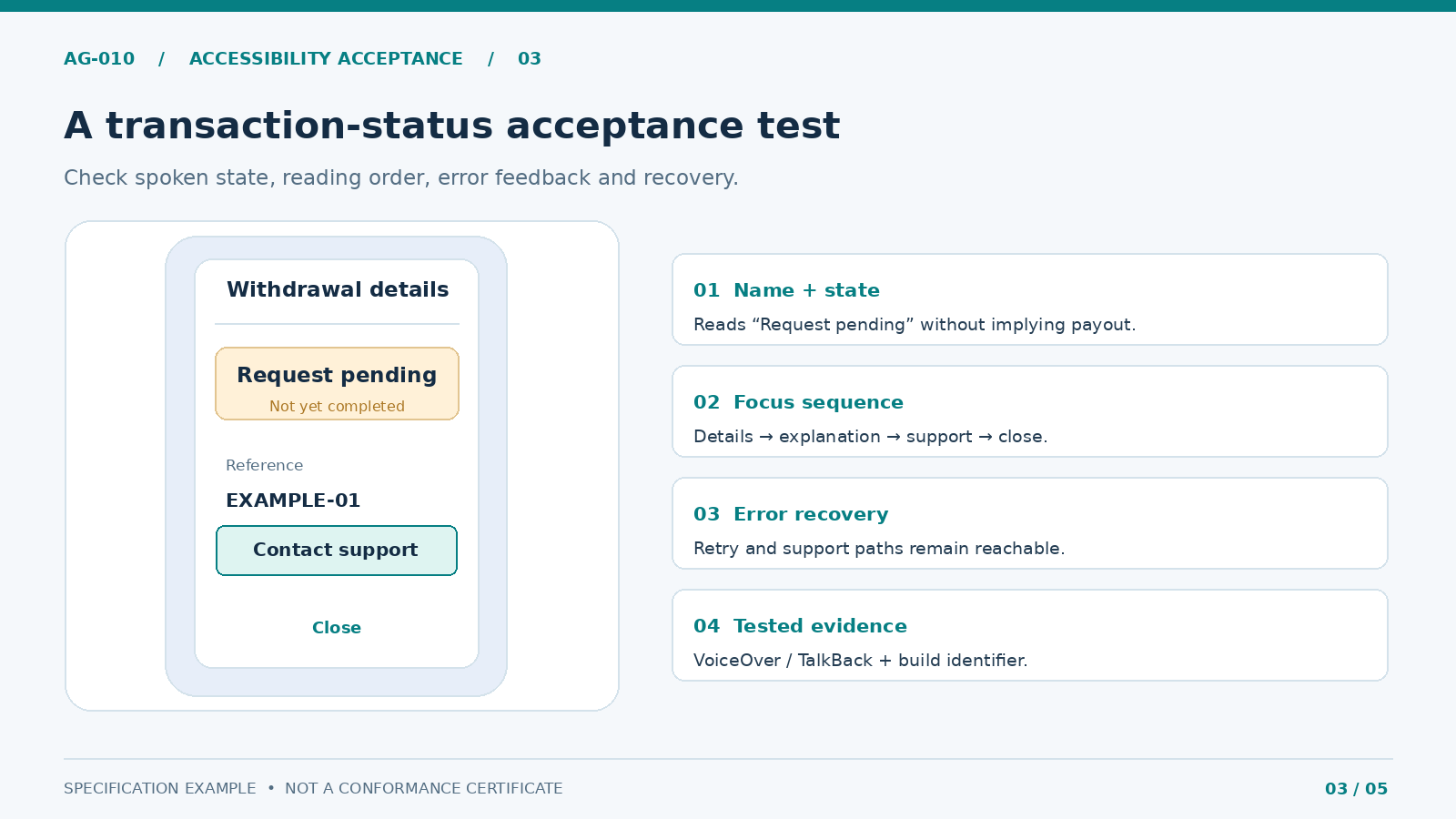
A01 can be tested on a withdrawal-status screen: when VoiceOver or TalkBack focuses the status, it must distinguish “request pending” from “completed,” and the focus order must reach the explanation and support path. Test labels in all required languages; a string may be visually correct but announced in an unintelligible order. For a hybrid view, verify transitions between native and embedded web content rather than assessing each in isolation.
4. Attach Evidence to Each Criterion and Build
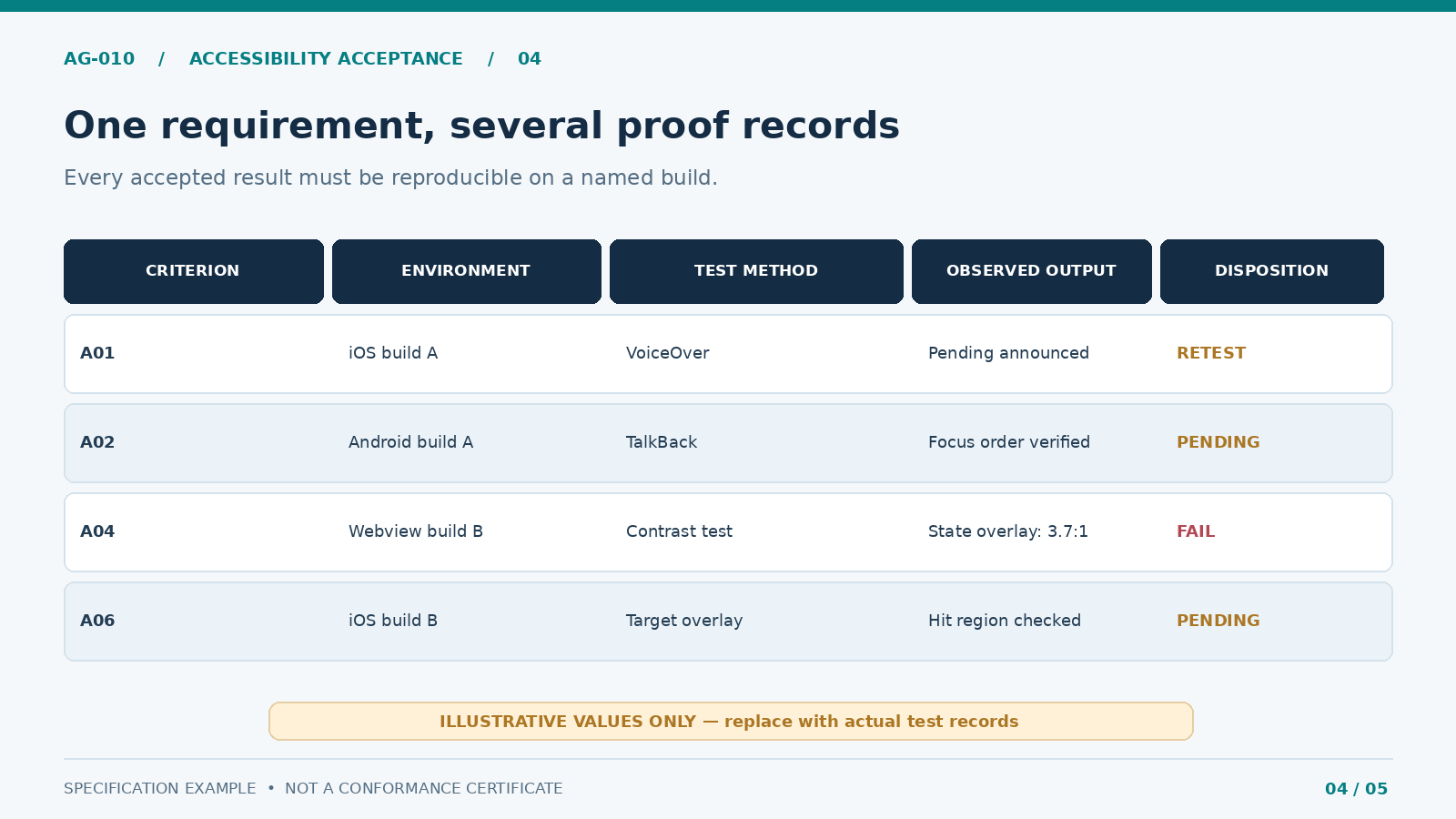
Evidence must answer what was tested, on which build, with what settings, by whom, and what happened. A bare “pass” column is insufficient when a vendor and buyer disagree about a defect. Store a test-case ID, requirement ID, app build, platform, assistive technology, steps, expected output, observed output, result and retest link. Redact account identifiers and payment details in captures.
On iOS, test VoiceOver, Dynamic Type, Switch Control or other applicable input alternatives and use Accessibility Inspector to inspect element metadata. Apple’s audit guidance warns that passing automated audits does not guarantee an accessible app. On Android, combine TalkBack journeys with manual and automated accessibility testing; include system font scaling and relevant interaction services.
| Evidence type | What it proves | What it does not prove |
|---|---|---|
| Inspector / automated audit | Detectable label, hit-area and contrast issues | Complete journey usability |
| Screen-reader walkthrough | Announcements, order and actions on a named build | Behavior on every device or locale |
| Contrast measurement | Exact sampled foreground/background combinations | All states or overlays were tested |
| Defect + retest pair | A reported failure was reproduced and fixed | Unrelated criteria are now compliant |
| User study, where feasible | Task barriers observed with participating users | Formal conformance by itself |
When a criterion spans native and webview surfaces, keep both evidence records and one end-to-end handoff test. If an identity provider opens an inaccessible step, name the supplier, escalation owner, interim mitigation and acceptance decision. Never label an untested integration “not applicable” merely because it is licensed separately.
5. Run Defect Acceptance and Exceptions as Formal Gates
Define severity by task impact. A blocker prevents a user relying on an assistive technology from entering, understanding, completing or exiting a critical journey. A major defect makes a task substantially harder or unreliable; a minor issue has a bounded impact and a documented workaround. Severity labels are team conventions, not WCAG conformance grades.
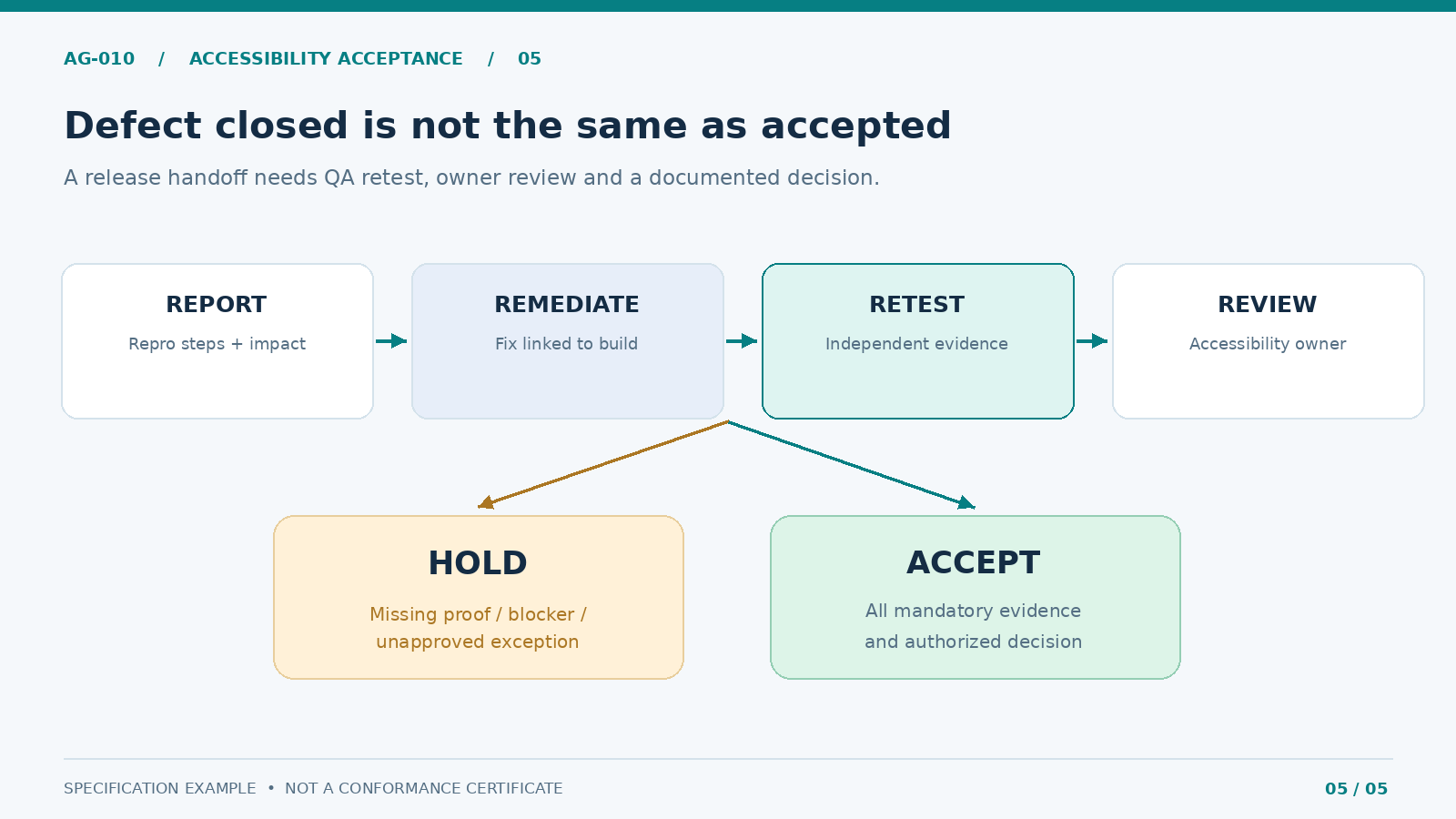
Use a simple flow: tester records the issue → engineering fixes it → independent QA repeats the same steps → accessibility owner reviews the result → product owner records the disposition. An exception must include scope, user impact, temporary alternative, responsible person, expiration/review date and explicit approval. “Vendor limitation” and “will fix later” are not completed exceptions.
Suggested release gate: HOLD when a blocker is open, a critical user journey lacks evidence, or an unapproved exception remains. Release acceptance requires all mandatory checks passed or separately evaluated under a documented, authorized risk process. Do not represent conditional acceptance as WCAG conformance, accessibility certification or regulator approval. For a production go/no-go procedure, use the separate phased rollout plan.
6. Copy This Accessibility Product Brief Into the Vendor Handoff
The editable accessibility acceptance workbook accompanies this article. Its initial decision is HOLD because sample entries have no verified evidence. The product brief template, acceptance-criteria CSV and defect log can be attached to an RFP, statement of work or sprint acceptance package.
Before approval, ask the delivery team to provide: a versioned accessibility baseline; a list of required user journeys; platform-specific behavior specifications; screen-reader and text-scaling test results; an inventory of third-party exceptions; defect/retest links; named reviewer decisions; and a dated product-owner signature. Make the contract describe who pays for remediation and which evidence must exist at each milestone.
Set an explicit change rule. A new payment component, navigation pattern, OS update or SDK revision may invalidate the prior result for the affected journey. Record the changed component, impacted criteria and required regression evidence. Keep sampling strategy in the QA device matrix; this brief defines what must be accepted, not how many devices to purchase or test.
The outcome is a clear commercial and engineering handoff: a product owner can reject undocumented claims, a vendor can understand the required proof, and an accessibility specialist can test the result. Accessibility remains an ongoing quality responsibility after sign-off, not a one-time checkbox.
FAQ
Does WCAG 2.2 certify a native gambling app?
No. WCAG 2.2 is a W3C Recommendation for web content. WCAG2ICT and WCAG2Mobile provide informative interpretation for non-web and mobile contexts. A product brief or passing test set does not, on its own, establish legal compliance or independent certification.
Should iOS buttons be exactly 24 CSS pixels wide?
No. The 24 CSS-pixel condition is from a WCAG web criterion with exceptions. Native iOS guidance uses points and Android guidance uses dp. Keep these measurements separate and assess the actual touchable area.
Can automated accessibility scans replace VoiceOver and TalkBack testing?
No. Scanners help locate some issues but cannot reliably establish whether a complete financial or account journey is understandable and operable. Include manual assistive-technology journeys and retests.
What blocks sign-off when a vendor says accessibility is complete?
An untested critical journey, unresolved blocker, missing build-specific evidence or unapproved exception should trigger HOLD under the sample acceptance gate. Any deviation needs an identified authority and a documented decision, not an implicit waiver.