Real-money gambling app submission requirements depend on the store, the gambling product, the legal operator and every territory where the app can be used. An operating license alone does not grant permission to distribute on Apple’s App Store or Google Play. The publisher must also meet store rules, supply review evidence and enforce permitted-market access.
The short answer: establish eligibility for each market and product category; identify the authorized publishing entity; compile current licenses; confirm age, location and responsible-gambling controls; supply working reviewer access; and obtain the required store decision before distribution. Repeat this assessment when a license, owner, market or store policy changes.
This operational guide is not legal advice or an approval guarantee. Policies were checked on November 3, 2026; local counsel should verify each jurisdiction.
Check Store and Market Eligibility Before Creating a Submission
The stores have different approval routes. Apple’s App Review Guidelines, section 5.3, require real-money gaming and lottery apps to have necessary licenses and permissions where used, apply geographic restrictions and be free to download. Section 5.3.3 also prohibits using Apple’s in-app purchase system to buy credits or currency for real-money gaming.
Google Play generally restricts real-money gambling apps but provides a specific route for eligible, licensed operators. Under its Real-Money Gambling, Games, and Contests policy, a developer must complete the gambling application process for supported products and places. A listed country does not establish approval for every activity or subdivision.
| Eligibility question | Apple App Store | Google Play |
|---|---|---|
| Is the activity lawful and appropriately licensed where used? | Required under guideline 5.3.4 | Required for each relevant market and product type |
| Is gambling-specific store approval needed? | Regulated-app evidence is reviewed with the submission | Separate gambling application and certification process |
| Must the app be free to download? | Yes | Yes |
| Can store in-app billing fund gambling credits? | No Apple In-App Purchase for real-money gaming credits or currency | No Google Play In-app Billing for the gambling app |
| Must access be geographically restricted? | Yes, to permitted locations | Yes, to licensed and authorized locations |
| Are age-related controls required? | Correct age-rating disclosures and applicable legal protections | Underage users must be prevented; adult-only or equivalent rating |
| Is responsible-gambling information required in the listing? | Assess applicable law and Apple’s general rules; do not assume Google’s wording applies | Yes, in the app and its listing, with market-relevant support information |
Google publishes both a gambling application form and country/region allowances. Check the live pages by jurisdiction and gambling type instead of relying on a static country list.
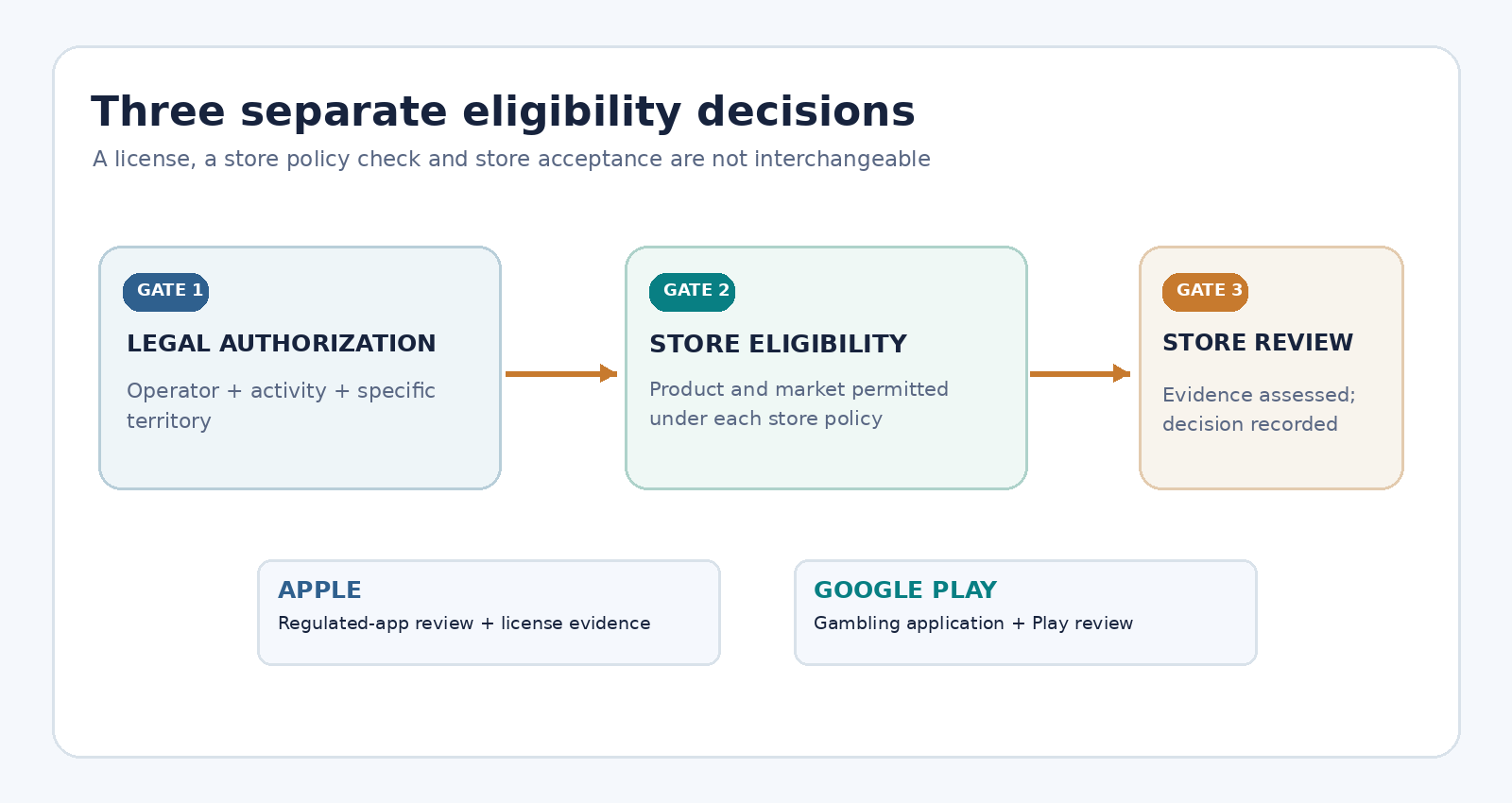
Figure 1. Local authorization, store eligibility and store review are separate gates. None substitutes for another.
Make the decision at market-and-product level
Record the gambling type, operator, license reference, authorization period, regulator, storefront status and reviewer for every territory. A state-level license is not nationwide permission. Mark unresolved combinations hold.
The downloadable market eligibility matrix provides fields for both stores, policy URL, last-check date and counsel approval. No market is pre-approved in the template.
Compile Licensing and Publishing-Entity Evidence
The account that submits an app must be linked to a legitimate party responsible for the service. Apple’s guideline 5.1.1(ix) says apps in highly regulated fields, including gambling, should be submitted by the legal entity providing the service rather than an individual developer. Apple’s review documentation guidance calls for applicable gambling or lottery licenses for each storefront where the app is available.
On Google Play, the developer must meet the operator and license conditions in the gambling policy and complete the corresponding application. The Google gambling application form also states that a new distribution market, new supported gambling category or ownership/licensing change can require a new application or recertification.
Maintain a controlled evidence packet with an owner, version and expiry date for each artifact.
| Submission artifact | Why reviewers or internal approvers need it | Custodian |
|---|---|---|
| Operating license and any relevant schedules | Links activity, entity, territory and authorization period | Legal/compliance |
| Publisher/entity record | Explains who controls the store account and offers the service | Operator/account owner |
| Product-to-license mapping | Shows that casino, betting, racing or lottery functions stay within permitted scope | Compliance/product |
| Store territory matrix | Links storefront configuration to approved territories | Release manager |
| Geographic and age-control test evidence | Demonstrates relevant controls, including rejection states | QA/compliance |
| Reviewer instructions and access credentials | Lets reviewers inspect permitted app functionality | Release manager |
| Responsible-gambling information and market contacts | Supports required user information and Google listing checks | Compliance/content |
| Policy verification log | Shows which official rule was assessed, by whom and when | Policy owner |
This is an internal checklist, not a universal upload requirement. Follow each store’s instructions. Keep credentials and sensitive documents secure; log references, not secrets.
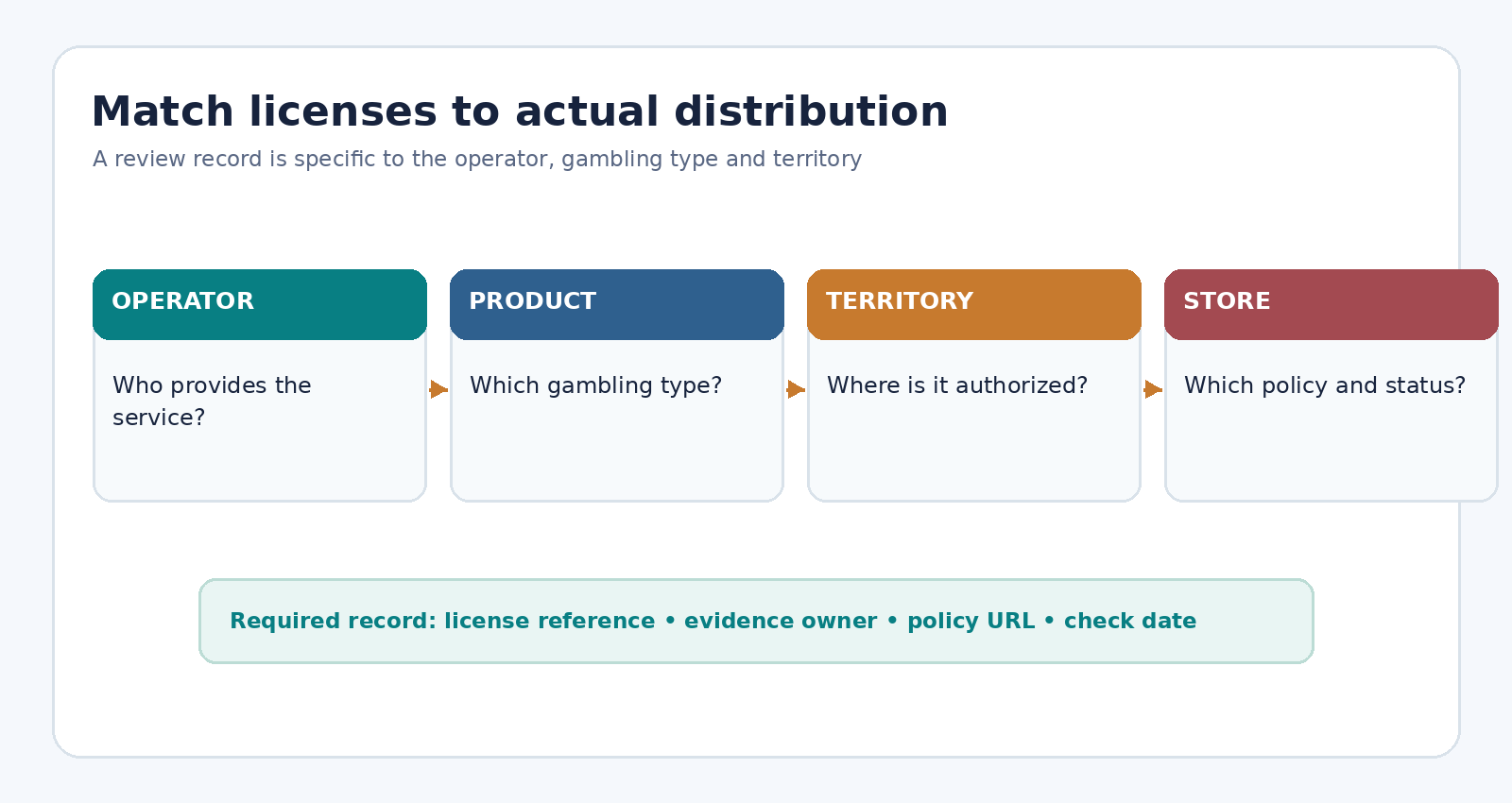
Figure 2. Every market-product combination needs a traceable license and accountable owner.
Avoid entity and license mismatches
A software agency, supplier, licensed operator and developer-account holder may be different entities. Document their relationship and authority. Confirm who holds the license, provides the service, owns the listing and answers reviewers. An agency account must not conceal the operator.
Configure Age, Geographic and Player-Protection Controls
Storefront availability governs where an app can be downloaded; in-app access controls govern use. Apple explicitly requires geographic restriction where real-money gambling is used. Google requires preventing access and use from areas not covered by the license.
Likewise, an adult rating does not replace legally appropriate age verification. Google requires eligible gambling apps to prevent underage use, carry an Adult Only or equivalent classification and display responsible-gambling information in the app and listing. Its country/region guidance also describes locally relevant third-party support details.
Before submission, a joint compliance and QA review should confirm:
- The distribution territory list matches the approved country/state/province combinations.
- Location restrictions block real-money functions when permission cannot be established, with an understandable user message.
- Underage or unverified users cannot access restricted gambling functions under the applicable legal rules.
- The age rating and description accurately represent the content; Apple’s age-rating questionnaire and Google’s content-rating requirements are completed truthfully.
- Required responsible-gambling statements, support resources and controls are reachable in the correct jurisdiction.
- Changes to the license or permitted market trigger a control review rather than merely a metadata update.
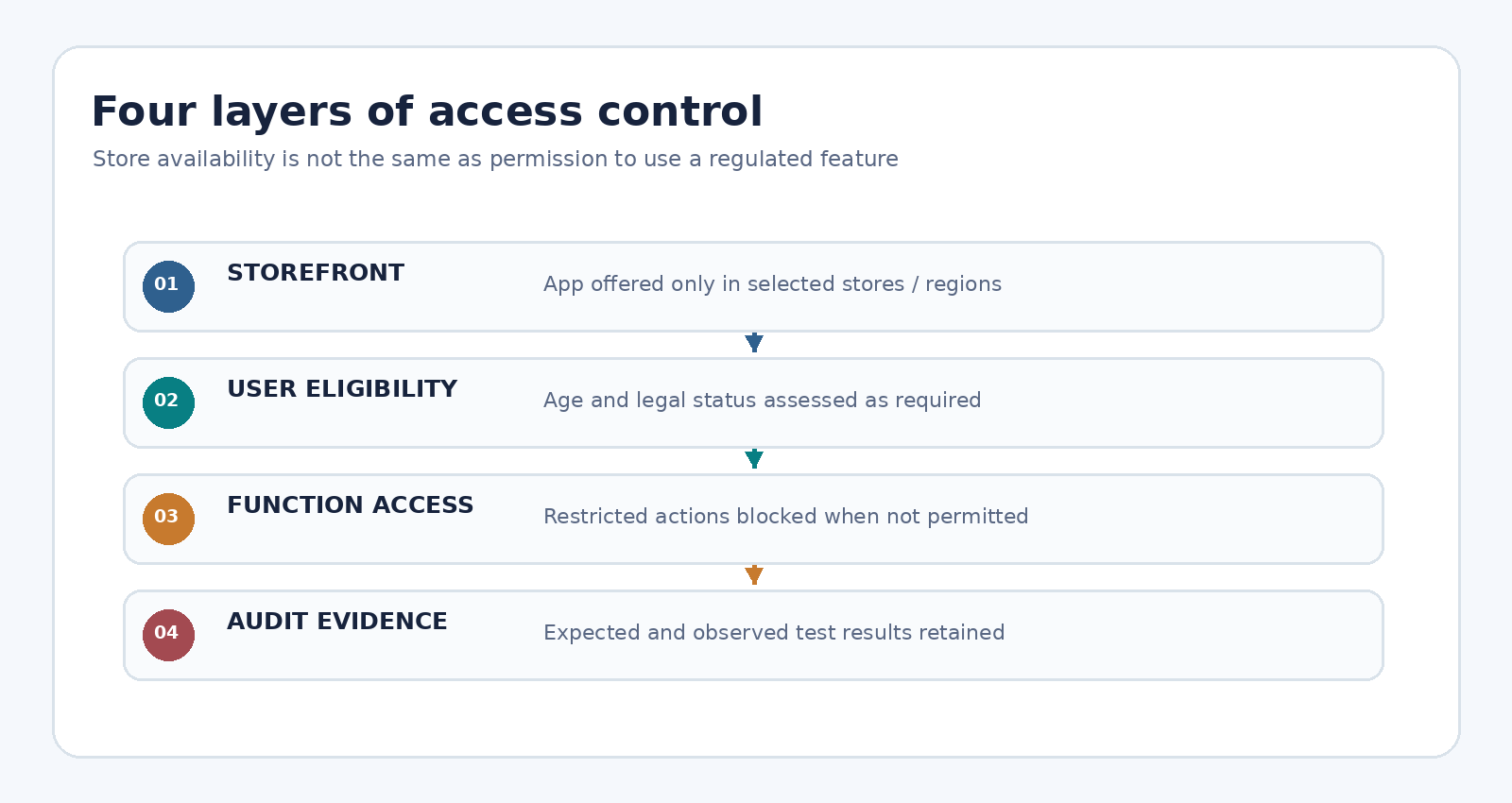
Figure 3. Storefront selection, user eligibility and in-app access enforcement solve different problems.
Record expected and observed results for allowed, blocked and indeterminate cases. Use authorized demonstration data without disabling real protections.
Prepare Review Notes and Safe Reviewer Access
Apple asks submitters to include the app’s purpose, meaningful changes, external dependencies, regional differences, appropriate regulated-industry documents and working access for account-based features. Its App Review guidance also describes a demonstration mode for regulated apps. Coordinate any special review arrangement with Apple rather than assuming a restricted app can be made reviewable through an undisclosed workaround.
Google Play requests the information needed to access restricted features through the Play Console App content review process. Google’s sign-in detail rules specify ongoing, reusable reviewer access. If normal access relies on one-time codes, geography or membership, explain the legitimate review route and resolve it using the platform’s documented instructions.
Use a reviewer packet with five sections:
- Identity and scope: operator name, exact app identifier, submitted version, store and intended territory.
- Legal authorization: license references and attachments requested for the relevant market and product.
- Product walkthrough: what the app does, restricted functions, test sequence and any regional variation.
- Approved access: credentials or demonstration mode, test data, authentication instructions and an active technical contact.
- Control evidence: where reviewers can observe age and location restrictions, relevant notices and support resources.
The review-notes template uses placeholders. Provide credentials only through approved secure fields.
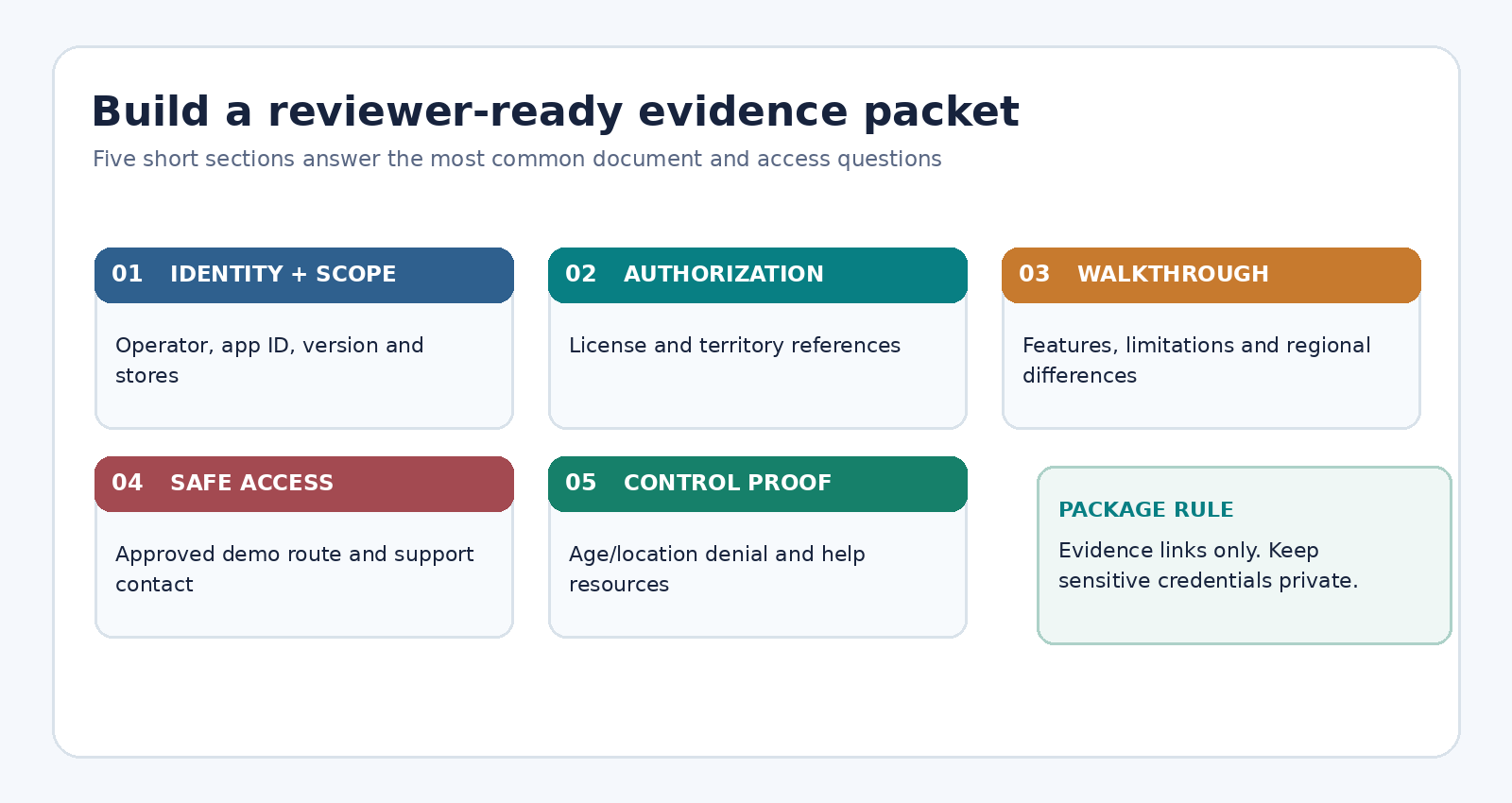
Figure 4. A complete packet helps reviewers verify the product without guessing which entity or market is in scope.
Submit to Apple App Review or Google Play
Assign an owner to each store path and archive submitted evidence versions.
Apple App Store submission sequence
- Confirm that the publishing entity, license coverage and geographic restrictions meet Apple’s current requirements.
- In App Store Connect, choose the appropriate app version and specific countries or regions; do not leave unintended broad availability enabled.
- Complete accurate content and age-rating declarations and attach required regulated-industry documentation.
- Provide App Review information, a functioning build and properly authorized demo access or an agreed demonstration mode.
- Submit for review, monitor messages and answer requests with targeted evidence. Record the decision and the approved version.
Apple’s publishing overview explains the standard build, availability and review steps. Approval does not eliminate the operator’s continuing legal and platform responsibilities.
Google Play submission sequence
- Check Google’s supported geography and product category against the operator’s license and the country/region allowance page.
- Complete the gambling application process for the relevant market and product. Do not assume approval in one market extends to another.
- Prepare the app bundle and required Play Console declarations, including app-access instructions and truthful content information.
- Confirm the app is free to install, does not use Google Play In-app Billing for gambling, has the appropriate adult rating and includes responsible-gambling information.
- Submit only within the approved scope and respond to review or certification requests. Keep the certification record with the app version.
Google states on its application form that gambling certification and app review can take at least a week or more; treat this as a planning caution, not an SLA. Apple’s review duration also varies, especially when licenses require checking. Neither store guarantees acceptance or a fixed review date.
Respond to Review Questions Without Losing the Audit Trail
When a reviewer asks for more information, answer the precise issue rather than repeatedly replacing the entire submission. Reconcile the store comment against the license, product configuration and evidence packet, then assign one response owner. If the problem concerns actual eligibility, hold the affected distribution scope until it is resolved.
Log store, market, version, cited policy, requested evidence, owner, response and outcome. Preserve original messages; avoid claims of universal compliance.
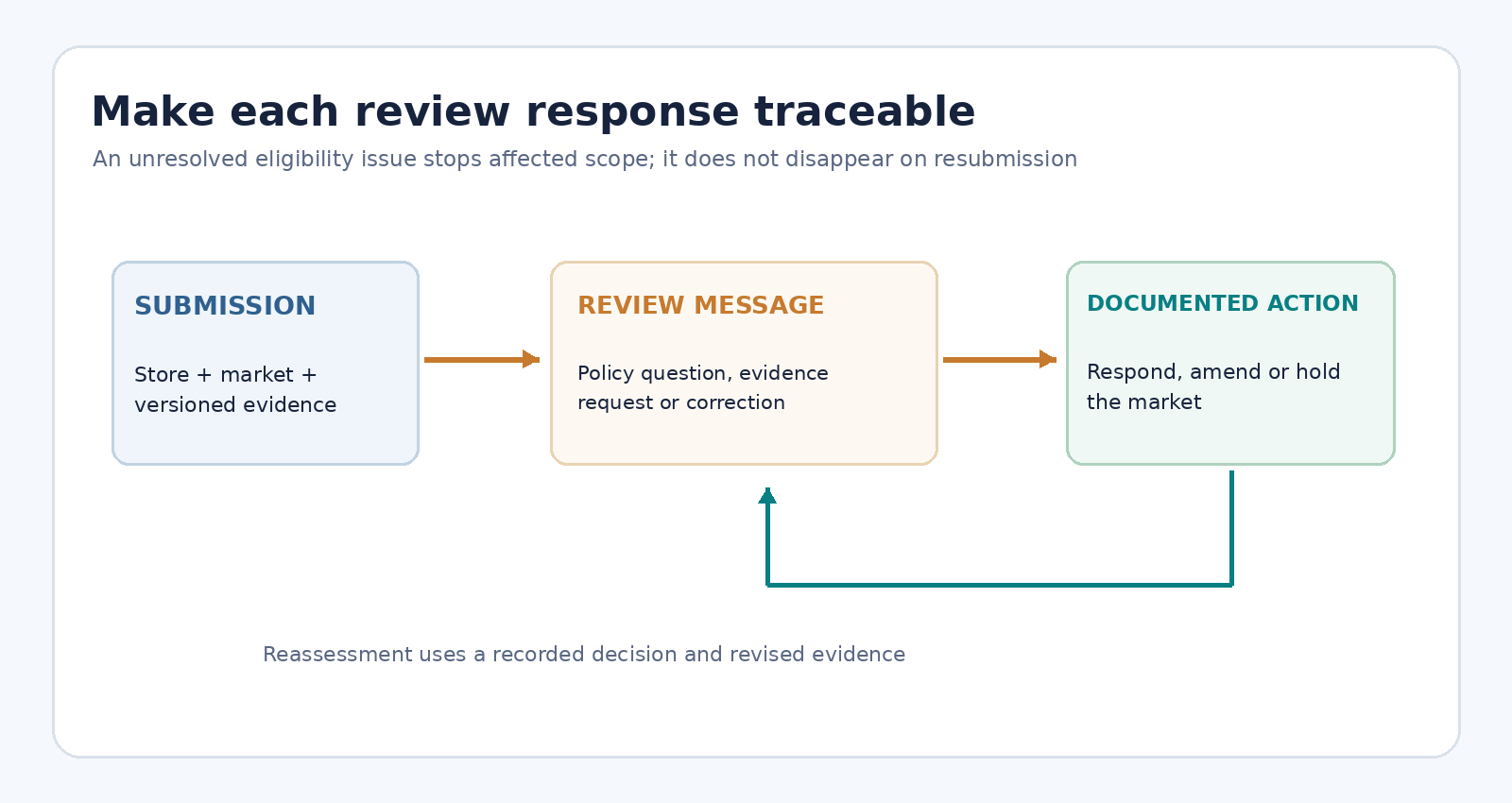
Figure 5. Every reviewer question should lead to a documented answer, correction or hold—not an undocumented resubmission.
The same discipline applies after approval. A new owner, additional gambling product, changed license or new territory may reopen eligibility questions. A production launch plan is a separate workflow; it should not be confused with acceptance into a store. See the planned phased rollout guide for deployment controls, and the device testing matrix for broader test coverage.
Monitor Policy Changes and Recheck the Decision
Store policies and country lists change. Recheck official pages before submissions, new territories, licensing changes and material updates; record the reviewer and result in the policy revision log.
| Trigger | Recheck | Required output |
|---|---|---|
| New territory | Local authority, operator license, both store policies | Updated market eligibility row |
| New gambling category | License scope and Play supported category | Product-to-license decision |
| Publisher or ownership change | Legal entity and store account eligibility | Entity evidence and any required recertification |
| License renewal or restriction | Validity, permissions and affected controls | Signed compliance decision |
| Store-policy update | Relevant guideline, form and country allowance page | Dated policy diff and submission action |
Set the disposition to approved internally, open, or hold; reserve the word “approved by the store” for an actual store decision. For adjacent work, keep ASO metadata and screenshot production, in-app localization and SDK privacy audit as separate, linked processes.
Frequently Asked Questions
Can a licensed gambling operator publish in every App Store country?
No. Legal permission, the specific product and platform conditions must be checked wherever the app is offered or used. Apple’s guideline 5.3.4 requires licensing and geo-restrictions; storefront availability alone is not proof of eligibility.
Does Google Play require gambling approval for each market?
Google’s application form directs developers to apply for each market where they want a particular gambling app distributed. New markets, supported categories and ownership or licensing changes may require a new application or recertification. Check the current form for the exact case.
Is an adult store rating enough to protect minors?
No. A content rating communicates intended audience; it does not replace effective age controls and any verification duties imposed by local law. Google’s gambling policy expressly requires prevention of underage use.
Can an agency submit the app on behalf of an operator?
An agency can prepare assets and coordinate the process, but the publisher’s identity and authority must satisfy store rules. Apple says apps in highly regulated fields should be submitted by the legal entity providing the service. Confirm the precise arrangement with the operator and each store.
What should a team do after a store rejection?
Read the specific reason, verify its policy basis, correct the issue or supply missing evidence, and reply through the store’s official review channel. Do not misstate locations, identities or app functionality to obtain approval.
Official Sources and Editorial Scope
Sources checked on November 3, 2026: Apple App Review Guidelines; Apple regulated-app review documentation; Apple App Store availability guidance; Google Play gambling policy; Google Play gambling application form; Google Play country/region allowances; and Google Play reviewer access requirements.
Store-review preparation is not regulatory approval or legal advice.